
Your Remarketing Ads Just Got More Personal

June 5, 2026

By Sam

Your Remarketing Ads Just Got More Personal

June 5, 2026

By Sam

Your Remarketing Ads Just Got More Personal

June 5, 2026

By Sam

Your database is full of people who raised their hand once. They clicked an ad, filled out the form, and went quiet.

Not because they lost interest. Just because the timing wasn’t right.

A well-placed PDF guide can change that. It lands in their feed, offers something genuinely useful, and gives them a reason to raise their hand again. Now you can see exactly what guide they’re receiving, and replace it with one that has your name on it.

What’s New

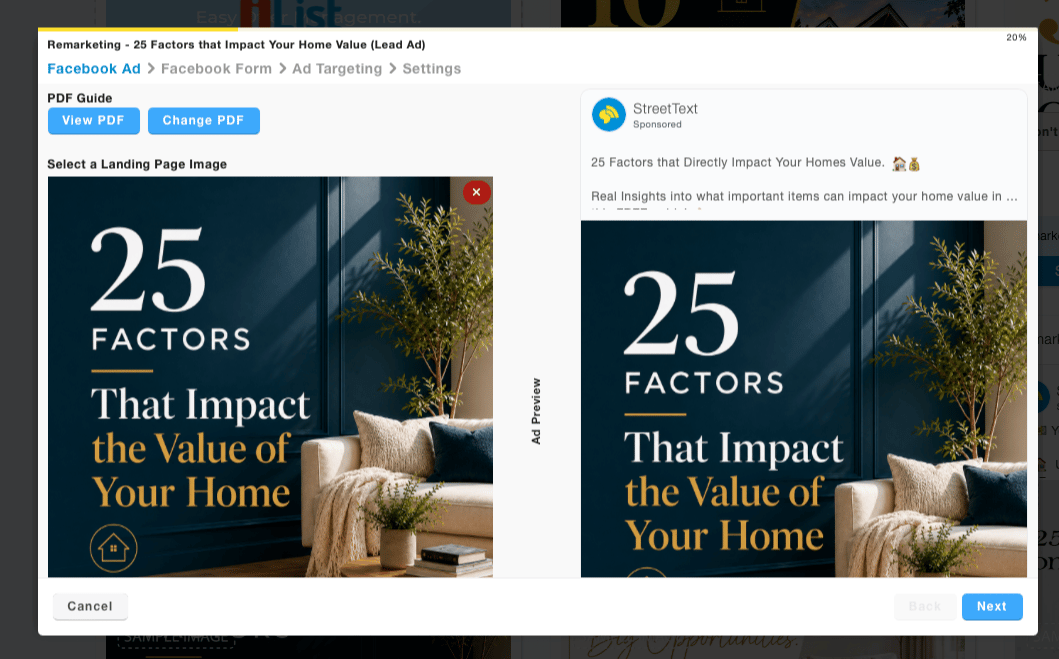
You can now view the PDF guide attached to your remarketing ads, and swap it out for one of your own, right from your StreetText ad builder.
Why It Matters

Here’s the thing about your lead database. On one of our recent community Masterminds Ira puts it plainly: “There’s somebody in there that is gonna be listing, they are gonna be buying. We want to get them to raise their hand again so we don’t miss that conversation.”

PDF guides are one of the best tools for doing that. When someone downloads a guide from your ad, they’re not just a lead — they’re a person who told you what they’re thinking about. Selling. Buying. Downsizing. The guide starts the conversation. Your follow-up closes it.

Shelby, a top-producing agent in western Colorado who credits StreetText as “a huge part” of rising to the top 5% of real estate, runs three separate remarketing bundles. One is dedicated entirely to PDF guides. “Every day,” Ira noted reviewing her account, “her whole database is seeing an ad they have the opportunity to raise their hand on.”

That’s the power of the guide bundle, done right.

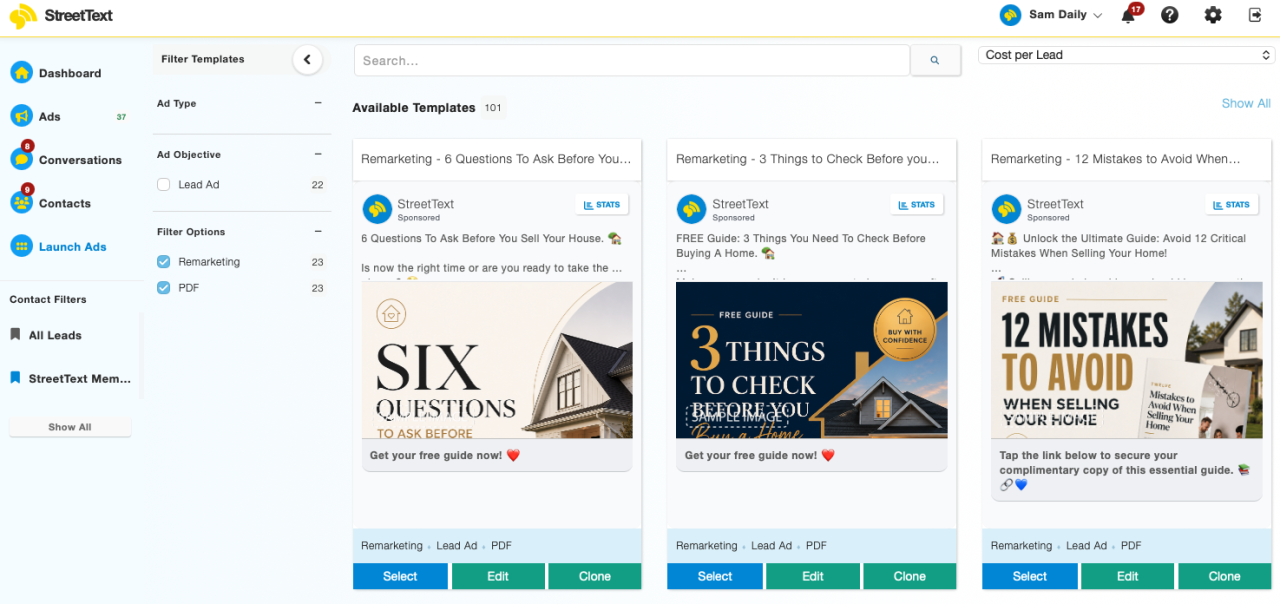
The following remarketing templates have already been updated with this new capability:

  • Remarketing — 6 Questions to Ask Before You Sell Your House (Lead Ad)
  • Remarketing — 3 Things to Check Before You Buy a Home (Lead Ad)
  • Remarketing — 12 Mistakes to Avoid When Selling Your Home (Lead Ad)
  • Remarketing — Seller Tips Ad (Lead Ad)
  • Remarketing — The Benefits of Scaling Down (Lead Ad)

StreetText is working through them guide by guide, starting with the ones that have historically gotten the most traction.


One More Thing: Brand the Guide

Once you can view the guide, you’ll want to make it yours. As Ira put it: “Branding is what happens when we’re giving people value. They click, they express interest, they come into our database. Branding is now our chance to show them who we are.”

The fastest way to brand these images: take a screenshot of the guide ad image, upload it to ChatGPT with your headshot and logo, and ask it to recreate the image with your branding. Tell it to keep your face and logo unchanged. One image, done in minutes, and now every person who sees that ad in their feed sees you.

Here’s two examples of branded. (With the actual ChatGPT Prompt to use below)

AI PROMPT

You are a professional advertising designer.

I will upload images in the following order…

Show full AI prompt
AI PROMPT

You are a professional advertising designer.

I will upload images in the following order:

1. Base Advertisement Image

* This is the original ad creative.
* Use this as the primary design reference.
* Preserve its style, colors, layout, composition, typography, lighting, and overall visual identity.

2. Profile Photo

* This is the person who should appear in the final advertisement.
* Replace any existing person if necessary, while matching the original lighting, angle, quality, and style.

3. Logo

* This is the official company logo.
* Integrate it naturally into the design without changing the overall aesthetic.

WORKFLOW

Step 1:
After receiving the first image, confirm:
“Image 1 received and confirmed as the base advertisement.”

If the profile photo has not yet been uploaded, respond only with:
“Please upload your profile photo (Image 2).”

Step 2:
After receiving the profile photo, confirm:
“Profile photo received.”

If the logo has not yet been uploaded, respond only with:
“Please upload your logo (Image 3).”

Step 3:
After receiving all required assets, create the final branded advertisement.

TASK

Update the original advertisement with my branding while keeping the creative as close to the original as possible.

Design Requirements:

* Maintain the exact look, feel, style, composition, lighting, color palette, mood, and overall aesthetic of the original image.
* Do not redesign, re-color, re-style, modernize, or reinterpret the artwork.
* Make only the minimum changes necessary to incorporate my branding.
* Seamlessly integrate my face into the image.
* Seamlessly integrate my logo into the image.
* Add my business name: [INSERT BUSINESS NAME] * Ensure all additions appear native to the original design.
* Match the original lighting, shadows, perspective, depth of field, texture, and image quality.
* Preserve the original visual hierarchy and marketing intent.
* Create a polished, professional, high-converting Facebook advertisement.
* Avoid AI artifacts, distorted text, inconsistent lighting, unrealistic facial features, or obvious edits.

Priority Order:

1. Preserve the original creative.
2. Integrate my face naturally.
3. Integrate my logo naturally.
4. Add my business name professionally.
5. Keep the result suitable for a premium Facebook advertising campaign.

Output Requirements:

* Generate one final image only.
* Do not provide alternative versions.
* Do not explain your edits.
* Do not include design notes.
* Do not change the aspect ratio unless required by the original advertisement.

That said, don’t let branding become a reason to wait. As Ira said on the call: “If you can’t get to it right away, it’s not a reason to not run the ads. Get your likeness out first. Brand the guides later.”

And once you have the guide? Repurpose it. As Leon from Tacoma reminded the group: “You can download the guide and send it out by email to folks directly.” Content is content. Use it everywhere.

How to View and Update Your PDF Guide

  1. Log into your StreetText account and click “Launch Ads” in the left hand menu to navigate to your Ad library.
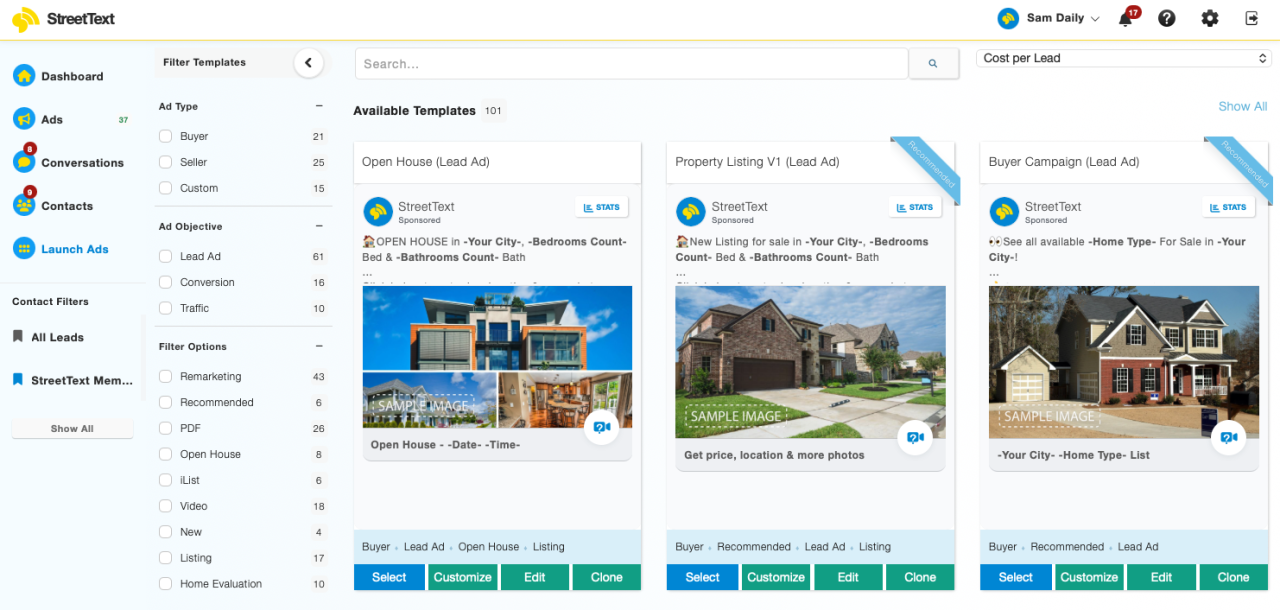
  1. Under Filter Templates and select PDF + Remarketing to see all the updated guide templates.
  1. Select one of the updated templates. You’ll now see a preview of the PDF guide attached to that ad. Click to open and read what your leads receive.
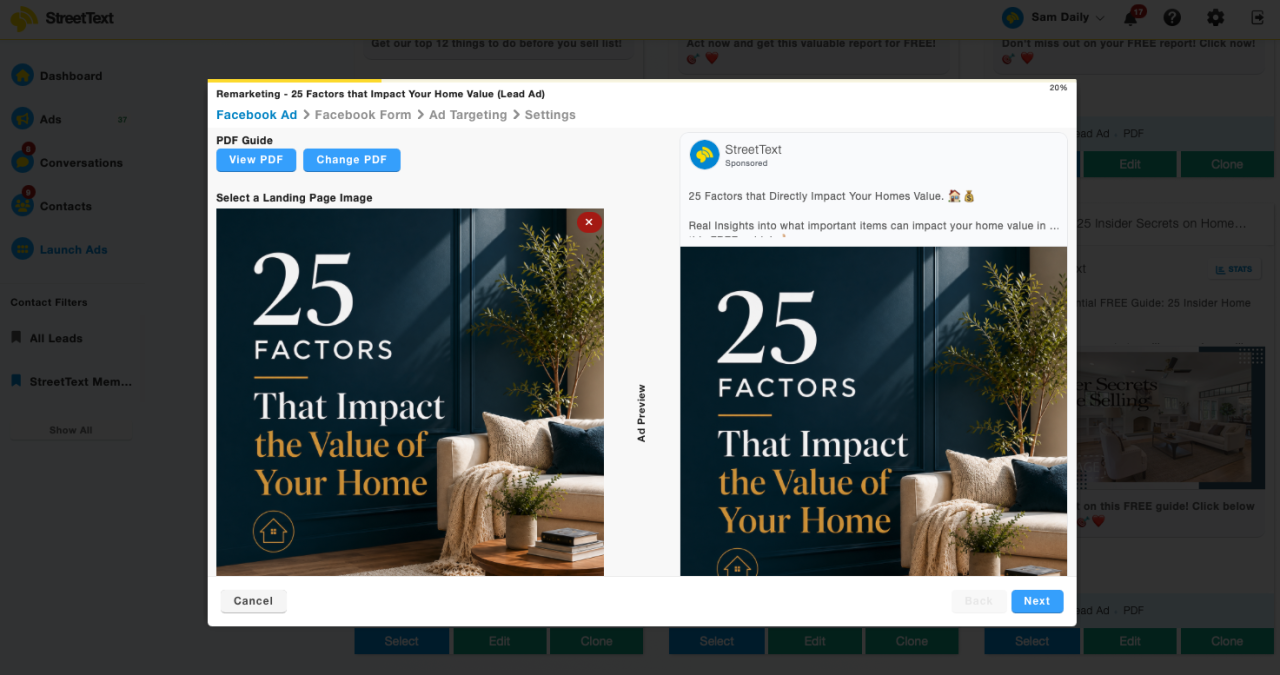
  1. To use your own branded guide, select the custom remarketing option, “change PDF” and launch. The guide on the other side of the ad will be yours.
  1. If you’re replacing an existing ad that’s already in a bundle: relaunch the updated template, create a new automation when prompted, add the new ad to your bundle, and remove the old version using the X in your bundle settings.
  1. Congrats! Your remarketing bundle now delivers an updated, high-quality guide. And with your branding on it, every touchpoint from ad to download feels like it came from you.

If you’ve built these guides out, don’t limit them to ads. Add them to your email campaigns. Mail them. Use them at open houses. As Ira said: “Content is content. Repurpose it.”

Go Make It Happen

The deals are already in your database. The guides help them raise their hand again. Go update yours today. You’ve got this.


Share
Share on twitter
Twitter
Share on facebook
Facebook
Share on linkedin
LinkedIn
Share on email
Email

StreetText makes advertising on Facebook & Instagram easy. Tap into new leads, be everywhere with remarketing, and exponentially grow your business 🚀

Leave a Reply

Your email address will not be published. Required fields are marked *

Related Article

Related Articles

AllMarketing TipsTutorialsCase Studies
Meta Ad Management best practices to keep long term performance on ads

What’s the normal lifespan of an ad on Facebook? And how to keep yours performing longer.

January 28, 2026

Today we were asked this question on our Mastermind. “After launching an ad on Facebook (and Instagram) and getting it...

Read More
Meta Andromeda Update

Everyone is getting this wrong about the Andromeda update

November 25, 2025

Over the past year we’ve seen cost per lead AND appointment improving. And there’s two big reasons for this.  First,...

Read More
Homebot home seller leads with StreetText

How to easily generate (and nurture) seller leads with the home value funnel ❤️

October 21, 2025

Watch how Windy is filling her database with home sellers. Windy is a Luxury Real Estate Agent and the host...

Read More

Related Articles

Product Updates

Your Remarketing Ads Just Got More Personal

Your database is full of people who raised their hand once. They clicked an ad, filled out the form, and went quiet. Not because they lost interest. Just because the timing wasn’t right. A well-placed PDF guide can change that. It lands in their feed, offers something genuinely useful, and gives them a reason to

Read More »
Meta Andromeda Update
Marketing Tips

Everyone is getting this wrong about the Andromeda update

Over the past year we’ve seen cost per lead AND appointment improving. And there’s two big reasons for this.  First, Meta is getting better at matching the right leads to the right ads. Second, our texting system is ensuring no inbound message is lost. Better leads + Better replies = More Appointments And a big

Read More »

Meet more home sellers and buyers with StreetText.

Digitally doorknock with Facebook ads that connect.

Meet more home sellers and buyers with StreetText.

Digitally doorknock with Facebook ads that connect.

Grow your business with StreetText.

Digitally doorknock with Facebook ads that connect.